 Sly Arcade
Misty Bathhouse
Match woodland guests with a warm bath and their favorite comforts.
Help
Tap a guest, then a bath · G selects · 1–6 assigns · Escape pauses. Use the game’s menu for sound and save tools.
Sound
Progress stays in this browser. Export in the game before clearing browser data.
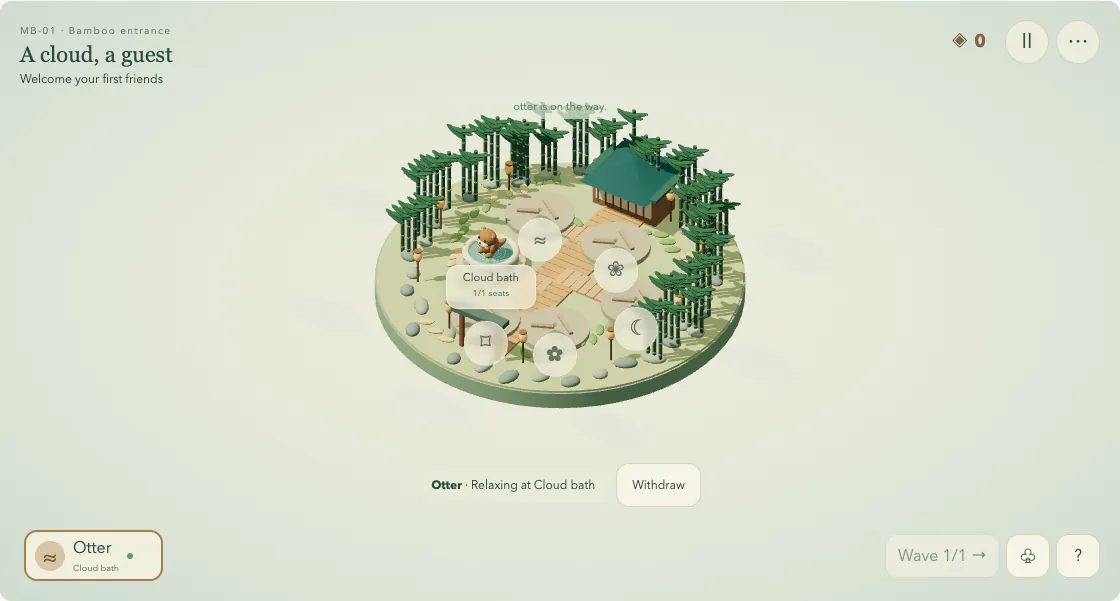
Your first move: Select a waiting guest, then tap a bath or its label. Cloud bath is always available.
After a level: replay & next steps
Notice what you restored, then follow the next objective. Revisit completed places for optional goals whenever you like.
How to play & controls
Welcome woodland guests, assign them to available baths, and restore the comforts needed by each chapter. A matching comfort pays more than a basic bath.
- Select a waiting guest, then tap a bath or its label. Cloud bath is always available.
- Read the task before spending stage coins. Restore preferred baths, respect their seat limits, and harvest sprigs when an aroma task asks for them.
- Once every goal is complete, open the lantern to finish the task. Chapter coins restart with each level; first completion and friendship rewards belong to your separate free garden.
Tap the animal or guest card, then the bath or facility label. G cycles guests; 1–6 chooses facilities; H harvests, A toggles a sprig, N opens the next wave, and Escape pauses. Use Settings for validated save export and import.
Tips & saving
Check both the guest preference and the task. A basic bath earns coins, but it does not count as a preference match. Restore a needed comfort before sending that guest elsewhere.
Let guests finish their walk and service before reusing a seat. For aroma goals, harvest a sprig, select Sprig on, and assign the guest to Herb garden.
Withdraw restarts a reservation and returns an unused sprig. If you need more coins, the bamboo bell brings a basic guest; Hint can invite a species for a missed preference. Free gardening opens after all 36 tasks.
Game progress belongs to this browser and this address. Use the game’s own save tools where available. Changing addresses or clearing browser data does not transfer your save.
Read the guide